Local AI Desktop Dashboard: Connect Your Data Without Cloud APIs
Build a private desktop dashboard that connects to your databases, spreadsheets, and APIs using local AI models. No cloud APIs, no data leaving your machine.

Local AI Desktop Dashboard: Connect Your Data Without Cloud APIs
Key Takeaways
- Local AI dashboards let you query your own data with natural language without sending anything to cloud providers like Anthropic, OpenAI, or Google
- Open-source tools like Wansan Studio, Byaan, and Cognitrix now offer desktop-first analytics with on-device AI models
- You only pay for electricity when the AI runs locally, not per-query fees to a third party
- Zosma Cowork brings this same private-first approach to your desktop with unlimited local AI access
Why Local AI Dashboards Are Different
Cloud BI platforms send your data to a third party for every query. Power BI routes through Microsoft servers, Looker sends data to Google Cloud, and even self-hosted tools often need a cloud LLM for natural language features. A local AI dashboard changes this. The model runs on your machine, your data stays on your machine, and the results appear on your machine. That is the entire flow.
Projects like Wansan Studio explicitly lock raw data rows on the local device and transmit only schema headers for AI inference. Byaan runs as a native Mac app or self-hosted Docker container where database traffic never routes through their infrastructure. You can share almost anything with zero risk because nothing leaves your hardware.
How Local AI Dashboards Work
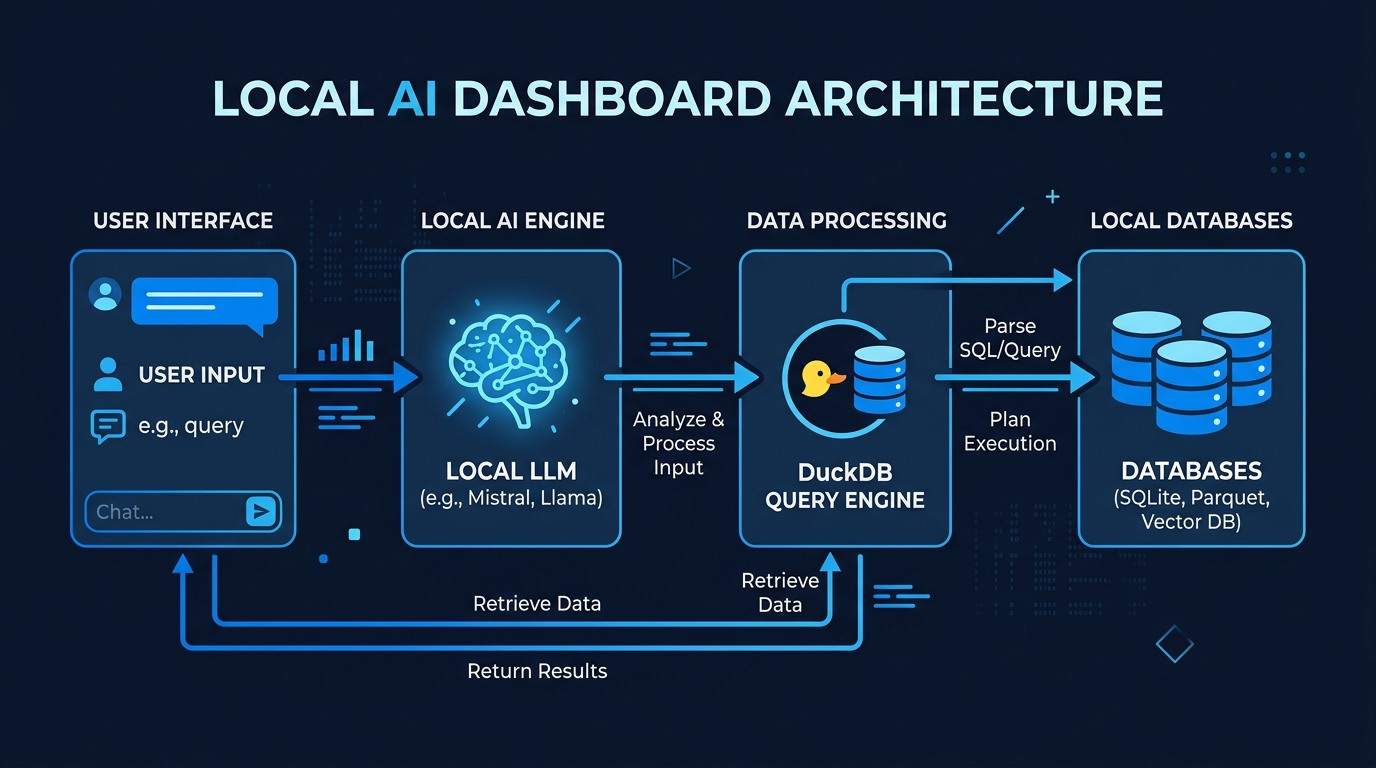
A local AI dashboard connects directly to your data sources and runs queries through an on-device model. You type a question in plain English. The model translates it to SQL or a direct query. The results render as charts, tables, or KPI cards. The whole process stays on your network.
DuckDB has become the engine behind most of these tools. It is an in-process OLAP database that handles complex joins and aggregations without a separate server. LocalSQLAgent, for example, runs queries in 3.7 to 5.4 seconds on average using Qwen models through Ollama. No network call, no API key, no latency from a remote endpoint.
The stack typically looks like this. A local LLM handles text-to-SQL conversion. DuckDB executes queries against your databases or flat files. A frontend renders the results as interactive visualizations. All three components run on your machine.
What Data Sources Can You Connect
Most local AI dashboards support the same sources you would connect to any BI tool. PostgreSQL, MySQL, SQLite, and CSV files are standard. More advanced setups include JSON, Parquet, Elasticsearch, and even S3-compatible storage.
Wekams Lens connects to PostgreSQL, S3, Azure Blob storage, Google Cloud Storage, JSON-lines log files, and Elasticsearch through a DuckDB federation layer. You can join across sources in a single query. The openislands project handles plain CSV, JSON, and Parquet files with typed data contracts that fail loudly if a column changes.
In practice, this means your sales data in PostgreSQL, your marketing exports in CSV, and your log files on disk can all be queried together from one dashboard. The AI handles the joins without you writing them.
Open-Source Tools Worth Knowing
The local AI dashboard space has several active projects. Each takes a different approach to the balance between simplicity and capability.
Wansan Studio is a local-first Chat BI app for macOS and Windows. It features an AI Business Semantic Layer, database connectors for MySQL and PostgreSQL, and a unified ingestion pipeline. The raw data stays on your device while only schema headers go to the model for inference.
Byaan offers a native Mac app, a community Docker version, and a team version with RBAC and SSO. It uses natural language to query databases, generate interactive dashboards, and schedule reports. The MCP interface lets AI coding assistants query your data through natural language.
Cognitrix focuses on Excel-first workflows. Upload a spreadsheet and ask questions in plain language. The agentic query engine generates read-only SQL through a ReAct agent loop, producing charts and dashboards on demand.
LocalSQLAgent is a pure text-to-SQL agent running on Ollama. It achieved 88 percent execution accuracy on the Spider benchmark with Qwen 3 Coder 30B. The whole system is free and runs entirely offline.
These are not demos. They are working tools you can deploy today.
Cost of Local vs Cloud BI
A 50-seat managed cloud BI deployment runs $30,000 to $150,000 per year according to industry data. A self-hosted BI tool has no license fees. You pay for infrastructure and engineering time. For a typical mid-market deployment, year-one costs run $5,000 to $40,000.
The math changes even more dramatically for desktop tools. When you run AI locally, you only pay for electricity. There are no per-seat fees scaling with team size. No API calls charging per token. No vendor lock-in through proprietary licensing.
Zosma Cowork takes this further as desktop-based co-worker software that helps people work with AI using local models. Private-first, unlimited, no cloud APIs. You get the same dashboard and data-querying capabilities without the per-user pricing model.
Privacy and Compliance Benefits
Regulated industries cannot send sensitive data to cloud AI providers. Healthcare has HIPAA, financial services has SOC 2, and EU companies face GDPR data residency requirements. A local AI dashboard solves these constraints by design. The data never leaves your environment.
Draxlr, a self-hosted BI platform, explicitly supports HIPAA, GDPR, and SOC 2 compliance through on-premise deployment with audit logging and role-based access control. Analytify operates the same way, with Docker Compose and Kubernetes deployment options for air-gapped environments.
When we tested local AI workflows at Zosma, the compliance question became straightforward. Anthropic, OpenAI, Google, Meta, and Chinese AI labs cannot see your data because the model runs locally. You do not need data processing agreements, BAAs, or vendor security questionnaires for your own hardware.
Building Your Own Local Dashboard
You do not need to build from scratch. The pieces are available and documented. Start with an in-process query engine like DuckDB for your data sources. Add a local LLM through Ollama for text-to-SQL conversion. Wrap it in a simple web frontend for visualization.
DuckDB handles most relational databases through native connectors. Ollama runs models from Qwen, Llama, and Mistral on consumer GPUs. For visualization, libraries like ECharts and Recharts provide charts out of the box. The total stack fits on a single machine.
Zosma Cowork packages this same approach into a desktop experience. Connect your data sources, ask questions in plain language, and get dashboards without configuring any of the plumbing. We cover the setup so you can focus on the analysis.
For businesses that need accounting automation alongside their dashboards, Zosma built local AI agents that connect to Tally ERP. Automate bookkeeping, invoicing, GST reports, and reconciliation, all running on-premise.
When Local Dashboards Do Not Fit
Local AI dashboards are not a replacement for every analytics need. They work best when your data fits on your network and your queries do not require cloud-scale compute. If you are joining petabyte data lakes across regions, a cloud warehouse still makes sense.
Shared collaboration is also more limited. Cloud BI tools let anyone with a link view a dashboard. A local dashboard lives on one machine. You can export reports and share images, but real-time collaboration requires additional infrastructure.
Be honest about your use case. Local AI shines for private data, small to medium datasets, and teams that value control over convenience. It is not magic, but the privacy and cost benefits are real.
Frequently Asked Questions
What hardware do I need for a local AI dashboard?
Most local AI dashboards work on a standard laptop or desktop. The model runs locally through Ollama or a similar runtime. A GPU with 8 GB of VRAM or more handles text-to-SQL models comfortably. Cloud providers like Anthropic, OpenAI, and Google do not need your data because nothing routes through their servers.
Can I connect multiple databases to one dashboard?
Yes. Tools like Wekams Lens and Byaan support connecting PostgreSQL, MySQL, and flat files simultaneously. DuckDB federation lets you join across sources in a single query. All data stays on your network throughout the process.
Is a local AI dashboard more expensive than cloud BI?
For individual users and small teams, local dashboards are significantly cheaper. You only pay for electricity and hardware. A 50-seat cloud BI deployment costs $30,000 to $150,000 per year. Local tools have no per-seat licensing fees.
Do local AI dashboards support natural language queries?
Yes. Local LLMs like Qwen and Llama handle text-to-SQL conversion with accuracy comparable to cloud models for most business queries. LocalSQLAgent demonstrated 88 percent execution accuracy on the Spider benchmark using a local Qwen model.
How does this relate to Zosma Cowork?
Zosma Cowork is a desktop-based co-worker software that helps people work with AI using local models. It brings private-first, unlimited local AI to your desktop. You connect your data, ask questions, and get results without cloud APIs. See our guide on how Zosma Cowork turns your desktop into an AI workspace.
Ready to build your own local AI dashboard? Start with our guide on automating your company with local AI agents to explore the broader automation possibilities.