Zosma Cowork vs AI SaaS: Real Cost Comparison for Teams in 2026
Most teams spend $50-200/month per user on AI SaaS subscriptions. See how Zosma Cowork local AI stacks up on cost, privacy, and ROI.
Zosma Cowork vs AI SaaS: Real Cost Comparison for Teams in 2026
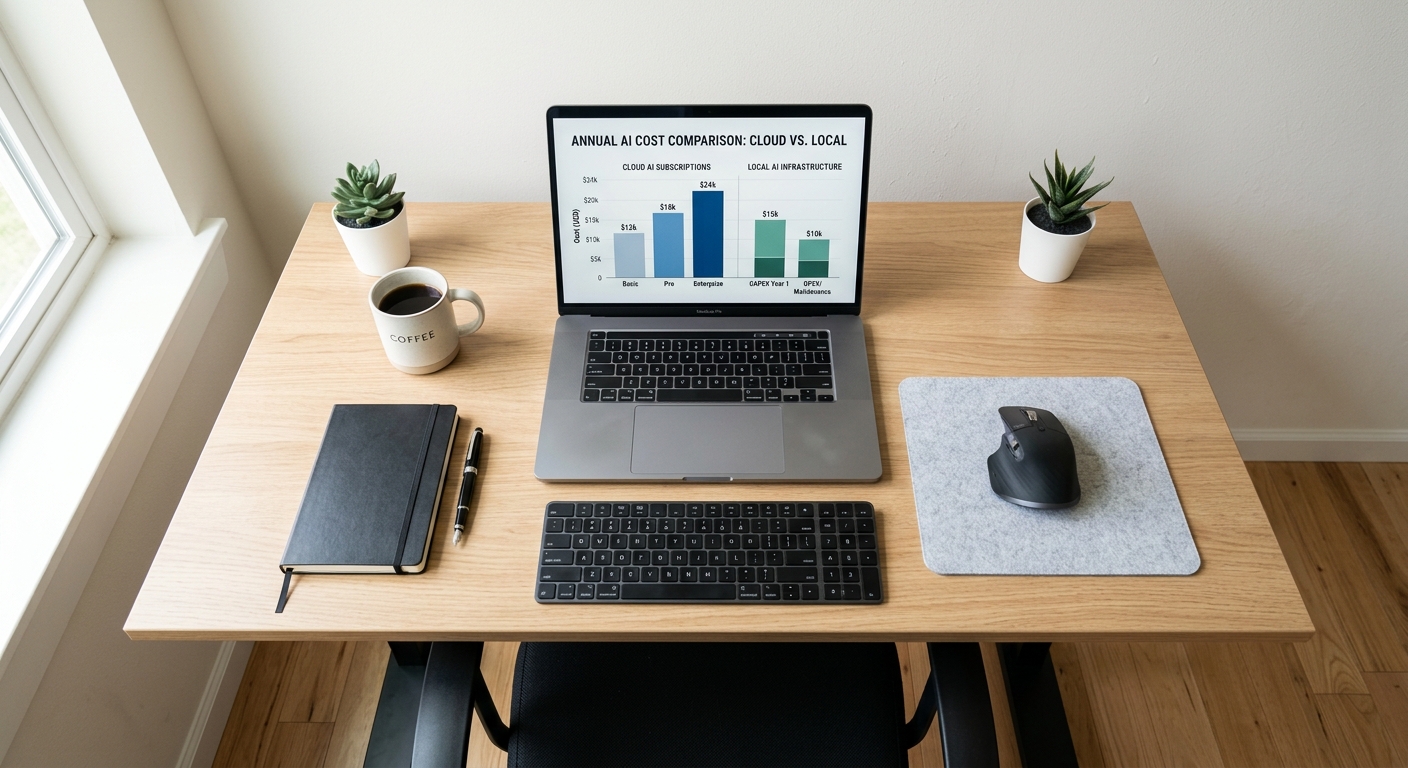
Most teams pay $50-$200 per user per month for AI SaaS subscriptions. Local AI on your desktop costs you only electricity after the initial hardware. The break-even math changes fast once you calculate it across a whole team.
The True Cost of AI SaaS Subscriptions in 2026
The average knowledge worker now uses three or more AI tools monthly. ChatGPT Plus runs $20/month, Claude Pro is $20/month, and Microsoft 365 Copilot adds another $21/month per seat. Stack them together and a single user is spending $61/month on AI subscriptions alone. For a 10-person team, that is $610/month or $7,320/year, before you even factor in premium tiers.
Anthropic's Team pricing starts at $25 per seat monthly for Standard and $125 for Premium, with a five-seat minimum. OpenAI's ChatGPT Business lands at $25 per user per month on annual billing. The numbers look manageable per person until you multiply by headcount and billing cycles.
What teams actually spend
A typical small team subscribes to at least three AI tools for different work. The writing assistant, the coding copilot, and the research agent. Each one bills monthly. Each one adds usage limits that push power users toward pricier tiers.
In practice, teams we work with spend $400-$2,000 per month across all AI subscriptions. The numbers compound because most tools price per seat with no meaningful discount for multi-year commitments.
Hidden costs that inflate the bill
Rate limits are the silent cost multiplier. When a user hits their daily message cap, they either slow down or upgrade. Both outcomes cost money. Claude Pro users report hitting limits after 40-45 messages in a five-hour window, which is barely a morning of work for heavy users.
Then there is the vendor lock-in tax. Switching from ChatGPT to Claude or vice versa means relearning interface patterns, migrating workflows, and sometimes rebuilding custom agents or GPTs from scratch.
How Local AI Changes the Math
Local AI runs models on your own machine. The model processes everything on-premise, so Anthropic, OpenAI, Google, Meta, or Chinese AI labs never see your data. You can share almost anything with zero risk because nothing leaves your desktop.
The cost model flips entirely. Instead of paying $20-$200 per month per tool, you pay once for hardware and then only cover electricity. For a team of five, that is the difference between $300-$1,000 per month in recurring subscriptions and a one-time setup that pays for itself in months.
The per-team break-even
A capable local AI setup costs $3,000-$5,500 upfront per workstation, depending on the model size you need. Over three years of amortization, that works out to roughly $83-$167 per month per machine. Compare that against $61+ per user per month in cloud subscriptions, and the local setup breaks even within a year even for moderate users.
The key insight is that local AI costs do not scale with usage. Send 10 prompts or 10,000 prompts in a day, and your cost is the same. You only pay for electricity.
Privacy as a cost multiplier
Data processing costs are a real line item for regulated businesses. When your customer data flows through Anthropic's servers or OpenAI's API endpoints, you need compliance reviews, data processing agreements, and sometimes third-party audits. Local AI eliminates almost all of that overhead because data never leaves your machine.
For legal and healthcare teams especially, the compliance savings alone can offset the hardware cost.
Zosma Cowork vs Individual AI Subscriptions
Zosma Cowork is a desktop AI workspace that consolidates multiple AI tools into a single local environment. Instead of juggling separate subscriptions for writing, coding, research, and document processing, you get one interface running models directly on your PC. Your context stays on your machine.
The cost comparison against individual subscriptions looks like this for a typical user:
Cloud stack per user:
- ChatGPT Plus: $20/month
- Claude Pro: $20/month
- Microsoft Copilot: $21/month
- Perplexity Pro: $20/month
- Total: $81/month, or $972/year
Zosma Cowork:
- One-time hardware cost (amortized): ~$100/month
- Monthly after hardware paid off: electricity only
- No per-seat fees, no usage caps
Scaling across a team
| Team Size | Cloud AI (per year) | Cowork (per year) |
|---|---|---|
| 5 people | $58,500 | hardware setup + electricity |
| 10 people | $117,000 | hardware setup + electricity |
| 25 people | $292,500 | hardware setup + electricity |
The gap widens dramatically at scale because cloud pricing is purely per-seat with no economies of scale. Every additional person adds another $80-$200 per month depending on tool stacking.
Usage freedom that subscriptions cannot match
Cloud subscriptions enforce hard usage caps. Claude Pro limits you to roughly 40-45 messages per five-hour window. ChatGPT Plus has similar soft limits that kick in during peak hours. Local AI has no rate limits because the model runs on your hardware.
When you only pay for electricity, there is no incentive for the provider to throttle your usage. Run as many document summaries, code reviews, or research queries as you need.
When Cloud AI Still Makes Sense
Local AI is not a universal replacement. Cloud providers still dominate in a few specific areas.
Frontier model quality is the first gap. GPT-5.5 and Claude Opus-class models run on infrastructure that consumer hardware simply cannot replicate. If your workflow depends on the absolute best reasoning capabilities for complex tasks, cloud is still the answer for those specific queries.
The hybrid approach
Most power users end up running both. Use local AI for high-volume, private, and routine tasks like summarization, drafting, and code assistance. Use cloud AI for the complex reasoning tasks where frontier model quality matters. This hybrid approach cuts API bills by 60-80% while keeping access to top-tier models when needed.
Burst workloads favor cloud
If your AI usage is spiky and unpredictable, cloud pricing handles load spikes without extra cost. Local hardware caps at its rated throughput. A sudden project requiring heavy AI work for two weeks does not scale on a single machine, whereas cloud APIs handle the surge instantly.
ROI Analysis: Three Scenarios
The break-even math depends on three variables: your current AI spend, your team size, and your usage intensity.
Scenario A: Solo founder on cloud AI
A solo founder spends $81/month on four AI subscriptions (ChatGPT, Claude, Copilot, Perplexity). Annual cost: $972. Over three years, that is $2,916. A local AI workstation costs $3,000-$5,500 upfront plus roughly $24-$150/year in electricity. The solo founder breaks even in about 12-20 months, then enjoys effectively unlimited AI for just electricity costs.
Scenario B: 10-person team
Ten employees each spend $61/month on AI tools. Annual spend: $7,320. Three-year total: $21,960. Local workstations for the same team cost $30,000-$55,000 upfront. Break-even lands between 18 and 24 months depending on hardware choices, after which the team saves $7,000+ annually.
Scenario C: Heavy API user
A developer running $500/month in API usage hits break-even against local hardware in under six months. The high-volume user is the fastest path to ROI because the hardware cost amortizes quickly against the recurring bill.
The Data Privacy Question
Every prompt you send to ChatGPT, Claude, or Gemini passes through the provider's servers. Anthropic, OpenAI, and Google retain the right to review and use that data for model improvement under their respective terms of service. Even with privacy-enhanced features, the data leaves your control the moment you hit send.
Local AI changes this entirely. Your documents, codebase, financial data, and customer records stay on your machine. No third-party can access them because no third-party has a copy.
For businesses handling sensitive information, this is not a convenience feature. It is a compliance requirement. The cost of a single data breach or compliance violation easily exceeds the total cost of ownership for local AI across an entire organization.
How Zosma Helps
Zosma Cowork addresses the fragmentation and cost of scattered AI subscriptions by providing a unified local AI workspace on your desktop.
- Consolidated workspace: One desktop application replaces multiple AI SaaS subscriptions for writing, research, document processing, and project management
- True data privacy: Models run locally on your PC. Anthropic, OpenAI, Google, Meta, and Chinese AI labs cannot see your data because it never leaves your machine
- No usage limits: Send as many prompts as you need. You only pay for electricity after the initial hardware setup
- Pay as little as ₹500/month for the AI brain: Your context stays on your PC, giving you unlimited intelligence for learning and daily work
Frequently Asked Questions
When does local AI break even against cloud subscriptions?
For moderate users spending $60-$80/month across AI tools, break-even lands around 12-18 months with a local workstation. Heavy users spending $200+/month break even in 3-6 months. The exact timeline depends on your hardware choice and electricity costs.
Can I share almost anything with local AI?
Yes. Because the model runs on your own machine, you can share documents, code, customer data, and financial records with zero risk. Anthropic, OpenAI, Google, and Meta cannot see your data because it never leaves your PC.
Does Zosma Cowork replace all cloud AI tools?
Cowork handles the majority of daily AI workloads including document processing, drafting, research, and project management. For tasks requiring absolute frontier model quality, you can still use cloud tools for those specific queries. Most teams use a hybrid approach.
What about teams where usage is sporadic?
Teams with low usage intensity will take longer to break even. If each person uses AI for less than two hours daily, the cloud subscription may remain more cost-effective for the first 2-3 years. Evaluate your actual usage patterns before deciding.
How much does local AI cost after hardware?
You only pay for electricity. A typical workstation drawing 200-400W during active use costs roughly $2-$25 per month depending on your electricity rate. After the hardware is paid off, your monthly AI cost drops to just that electricity bill with no usage caps.