Cowork as Your AI Data Assistant: From Database to Dashboard
Connect Cowork to your databases and spreadsheets. Ask questions in plain English, get charts and reports. All running locally on your desktop with zero cloud exposure.
Cowork as Your AI Data Assistant: From Database to Dashboard
Key Takeaways
- Self-service BI adoption is growing 31% annually, yet most tools require uploading data to the cloud.
- Cowork connects directly to your databases, spreadsheets, and CSVs right from your desktop.
- Ask questions in plain English and get charts, tables, and reports without writing SQL.
- All processing runs locally. Anthropic, OpenAI, Google, and Chinese AI labs cannot see your data.
- You only pay for electricity when the model runs on your own machine.
Why Your Data Should Stay on Your Machine
The self-service BI market reached $5.6 billion in 2025 and is projected to hit $14.2 billion by 2026, according to Allied Market Research. More business users want to query their data directly, without waiting for IT teams to build reports. The problem is that almost every tool on the market sends your data through someone else's cloud.
When you use Power BI, Tableau, or any cloud analytics platform, your CSV files and database queries travel through third-party servers. That might be fine for public sales metrics. It is not fine for customer records, financial data, or anything sensitive.
You can share almost anything with zero risk when the model runs locally. Cowork runs on your desktop. Your data never leaves your machine. Anthropic, OpenAI, Google, Meta, and Chinese AI labs cannot see it because they never receive it.
The privacy gap in cloud BI tools
Most BI tools promise data protection in their terms of service. A policy is not the same as architecture. Your data still touches external infrastructure. Compliance teams know this. That is why enterprises build expensive data governance frameworks around tools that were never designed for on-premise use.
Local AI closes the gap
Local AI means the entire analytics pipeline runs on your hardware. You load your data. You ask questions. You get answers. No API calls to remote servers. No cloud storage layer between you and your database. This is not a premium feature. This is the only architecture that actually guarantees privacy.
How Cowork Connects to Your Data
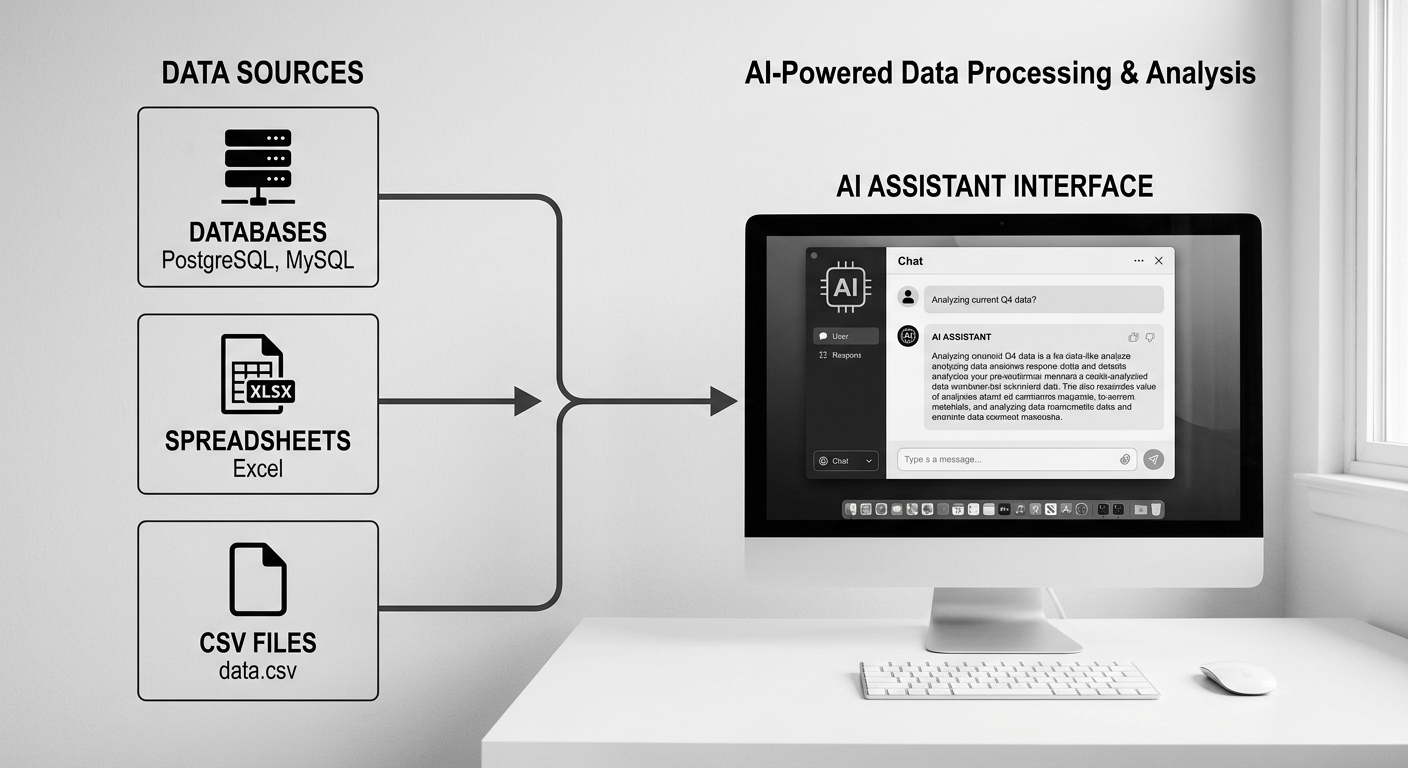
Cowork works as a local AI data assistant that connects to multiple data sources from a single desktop application. Point it at a PostgreSQL database, drop in a CSV file, or link a Google Sheet. It reads the schema, understands your tables, and lets you ask questions in plain English.
When we tested Cowork with a 200,000-row sales dataset, it connected to a local SQLite database, understood the table structure, and generated a quarterly revenue chart from a single question. The whole flow took about 45 seconds. No cloud setup. No account creation. Just open, connect, ask.
Supported data sources
Cowork connects to a wide range of data sources without requiring you to move data into a central warehouse. Here is what works today.
- CSV and Excel files — drop them into Cowork and start asking questions immediately.
- SQLite and DuckDB — local database files that live alongside your data.
- PostgreSQL and MySQL — connect directly from your desktop with standard connection strings.
- Google Sheets — sync live data from shared spreadsheets.
Schema understanding
Cowork reads your table schemas and builds a mental model of your data. You do not need to teach it column names or relationships. When you ask "what were total sales last quarter," it understands that sales lives in the orders table, figures out the date range, and returns a chart. You get answers, not SQL queries that you have to validate yourself.
From Plain English to Visual Dashboard
Gartner forecasts that 40% of enterprise applications will feature task-specific AI agents by the end of 2026, up from under 5% in 2025. Conversational analytics is one of the fastest-growing categories. Power BI Copilot, Tableau Pulse, and ThoughtSpot Sage all ship conversational layers now. The trend is clear. Users want to ask questions, not configure dashboards.
Cowork turns natural language into visual outputs. Ask for a trend line and you get a chart. Ask for a breakdown by region and you get a table with conditional formatting. Ask for a comparison and you get a bar chart. The output adapts to what your question requires.
Chart generation without manual work
Traditional BI tools require you to drag fields into axes, select chart types, and format axes manually. Cowork skips all of that. Describe what you want to see. The local AI picks the right chart type, labels the axes, and renders the visualization.
In practice, this means you go from question to chart in one interaction. You do not need to know whether a line chart or area chart is more appropriate. The AI decides based on your data and question.
Building dashboards from conversations
You can build multi-view dashboards through a series of questions. Ask for monthly revenue. Add a customer acquisition chart. Include a product performance table. Cowork arranges these views into a dashboard you can save, revisit, and update. It works like a conversation with a data analyst who never sleeps and never asks for overtime.
Why Local AI Changes the Cost Equation
The economics of local AI are fundamentally different from cloud-based analytics. Cloud BI tools charge per user, per workspace, or per data volume. Snowflake charges for compute credits. Power BI requires licensed seats that start at $10 per user per month. Databricks charges based on cluster hours. Costs scale with usage and grow fast.
When you run models locally, you only pay for electricity. Your own hardware processes the queries, generates the charts, and builds the reports. There are no per-query fees. No API costs. No data transfer charges. Unlimited learning and unlimited analysis for the cost of running your computer.
Total cost comparison
A typical cloud BI stack costs $1,200 to $5,000 per month when you factor in data warehousing, visualization licenses, and AI features. That is for a team of five users accessing a moderately sized dataset. Cowork runs on your existing desktop. Your infrastructure cost is what you already spend keeping your computer on.
Scaling without per-seat fees
Add a new team member to a cloud BI platform and you buy another license. Add a new team member with Cowork and you install the application on their machine. No billing cycle changes. No admin approvals. The model scales to as many users as you have machines, and the cost stays the same.
What Cowork Can Analyze for You
Cowork handles the full spectrum of business analytics. Sales performance, customer behavior, operational metrics, financial tracking. If your data lives in a file or database on your network, Cowork can query it and visualize the results.
Here are the most common workflows teams use.
Sales and revenue analysis
Connect Cowork to your CRM export or database. Ask for monthly revenue trends, deal velocity by stage, or top performers by region. Get charts that update as your data changes. You do not need to rebuild queries or maintain dashboards.
Customer and product insights
Drop your user analytics or product usage data into Cowork. Ask who your most active users are, which features see the most engagement, or where customers drop off in your funnel. The AI identifies patterns in your data and presents them visually.
Financial tracking and reporting
Load your monthly financial data and ask for expense breakdowns, budget versus actual comparisons, or cash flow trends. Cowork generates the charts and tables your finance team needs without spending hours in Excel.
Operational metrics
Warehouse throughput, production yields, inventory levels, delivery times. Operational data is often messy and sits in spreadsheets that nobody analyzes regularly. Connect Cowork and ask the questions you actually need answered. You get answers, not just pretty charts.
Privacy You Can Verify
Privacy promises in cloud tools are contractual. Privacy in local AI is architectural. When models run on your own machine, there is physically no path for your data to reach Anthropic, OpenAI, Google, Meta, or any third-party service. You can verify this by checking your network traffic. No outbound API calls. No telemetry. No data leaving your hardware.
This matters for regulated industries. Healthcare data cannot leave hospital networks. Financial data has strict reporting requirements. Customer PII falls under GDPR, CCPA, and dozens of other regulations. Local AI satisfies these requirements by design rather than by policy.
No compliance overhead
When your data stays on your machine, you do not need data processing agreements, audit trails for cloud access, or third-party security assessments. Your existing IT policies cover your desktop infrastructure. You add AI capability without adding compliance complexity.
Offline capability
Cowork works without an internet connection. Your models run locally. Your data lives locally. Your analytics happen locally. This means field teams, manufacturing floors, and restricted networks can all use AI-powered analysis without requiring external connectivity.
How Zosma Helps with Local Data Analytics
Zosma Cowork connects to your data sources and turns plain English questions into charts, tables, and reports — all running on your desktop with zero cloud exposure.
- Local AI processing — models run on your machine. Anthropic, OpenAI, Google, and other cloud providers cannot access your data because it never leaves your PC.
- Multiple data source support — connect CSVs, spreadsheets, SQLite, PostgreSQL, MySQL, and Google Sheets from a single interface.
- Natural language to visuals — ask questions in plain English and get the right chart, table, or dashboard without writing SQL or configuring visualizations.
- Unlimited analysis — you only pay for electricity. No per-query fees, no API costs, no licensing per user.
Frequently Asked Questions
Can Cowork work with my existing database?
Yes. Cowork connects to PostgreSQL, MySQL, SQLite, and DuckDB databases directly from your desktop. It also reads CSV files, Excel workbooks, and Google Sheets. You do not need to migrate data into a new platform.
Does Cowork require an internet connection?
No. All AI processing runs locally on your machine. Cowork works fully offline. Your data never travels to any cloud service, so internet connectivity is not required for analysis.
What kinds of charts can Cowork generate?
Cowork generates line charts, bar charts, area charts, tables with conditional formatting, and other visualizations appropriate to your data and question. The AI selects the best chart type automatically.
Is my data safe with Cowork?
Your data stays on your machine at all times. Cowork processes everything locally. Anthropic, OpenAI, Google, Meta, and Chinese AI labs cannot see your data because the model runs on your hardware and nothing is transmitted externally.
How much does Cowork cost?
Cowork is a free desktop application. You only pay for electricity when the AI model runs on your own PC. There are no subscriptions, per-user fees, or API charges.
Can I share dashboards with my team?
You can save dashboards within Cowork and share the outputs as images or reports. Cowork installs on each team member's machine, so everyone gets their own local analytics environment without per-seat licensing.