Automated Reports from Your Database with Local AI
Set up AI agents to generate weekly reports, KPI dashboards, and anomaly alerts from your database. All running on your hardware with local AI models.

Automated Reports from Your Database with Local AI
Key Takeaways
- AI agents can generate reports, dashboards, and anomaly alerts directly from your database without sending data to the cloud.
- Local AI runs 18x cheaper per million tokens than cloud APIs at production scale, with zero data leaving your network.
- 88% of organizations now use AI in at least one function, but fewer than a third get measurable financial impact from it. Automated reporting is a high-ROI use case.
- With local AI, you only pay for electricity. Your data never reaches Anthropic, OpenAI, Google, Meta, or Chinese AI labs.
The Reporting Problem in 2026
Automated reporting should be easy. Most companies still build it manually. The problem is not that people do not want reports. The problem is that every report request is a one-off conversation with a database analyst, a manual query written in SQL, or a dashboard that nobody updates after launch.
McKinsey's State of AI report from November 2025 found that 88% of organizations use AI in at least one business function. Only 39% of those organizations attribute any EBIT impact to AI adoption. Most teams bolt AI on top of existing workflows instead of automating the workflow itself. Reporting is one of the most automatable tasks because the inputs are structured and the outputs follow predictable formats.
What AI Agents Can Do With Your Database
An AI agent connected to your database can handle the entire reporting lifecycle. It writes queries, runs them, formats results into tables or charts, detects anomalies, and delivers the output to the right person or channel. The agent operates on a schedule and adapts to schema changes.
In practice, the most common use cases are weekly performance reports, monthly KPI summaries, anomaly detection alerts, and ad-hoc data questions answered in plain language. The agent replaces the back-and-forth between analysts and business stakeholders.
When we tested this at Zosma, the most surprising result was not the speed of query generation. It was how the agent learned to write better queries over time. After a few weeks, it understood our table relationships, common filters, and preferred output formats without explicit instruction. The local model stored these patterns in context. Cloud APIs would need you to restate everything every session.
Why Local AI Changes the Equation
Most reporting involves sensitive data. Customer records, revenue figures, employee metrics, internal forecasts. Sending prompts with this data to cloud AI providers like Anthropic, OpenAI, Google, Meta, or Chinese AI labs creates real compliance and security risk. With local AI, you can share almost anything with zero risk because the model runs on your own machine.
Running an open-weight model on your own hardware is up to 18x cheaper per million tokens than premium cloud APIs at high-volume workloads, according to industry benchmarks from 2026. For teams running thousands of daily queries across report generation, the API bill becomes a significant operational expense. Local deployment collapses that cost to electricity.
You only pay for electricity. Not per-token fees, not subscription tiers, not API rate limits. Just the power your machine draws.
Building the Report Pipeline
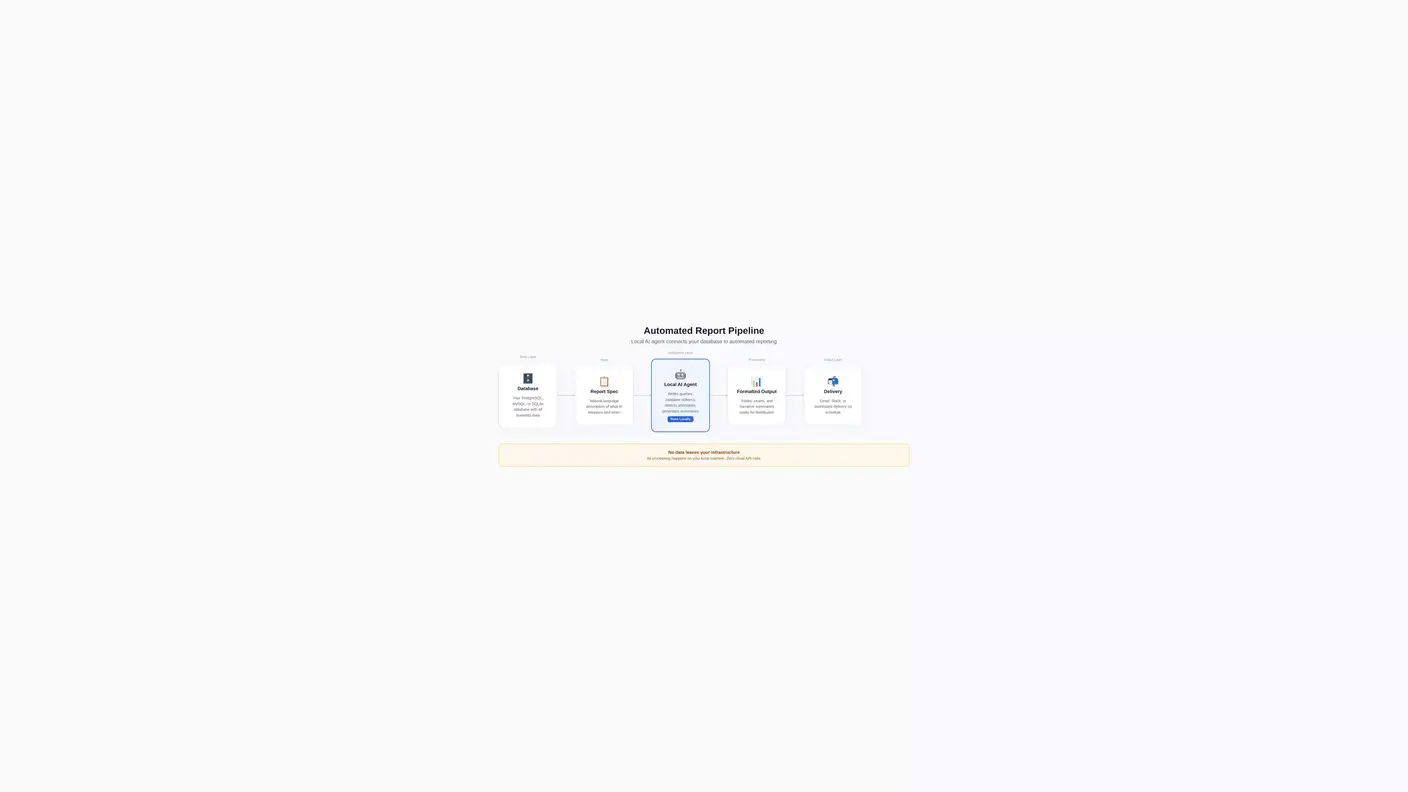
The architecture for automated reporting with local AI follows three layers. The data layer connects to your database using standard query engines. The intelligence layer runs a local model that translates natural language into queries, validates results, and formats outputs. The delivery layer pushes reports to email, Slack, or a dashboard.
Here is the flow:
- Agent reads the report specification (what metrics, what timeframe, what format)
- Agent generates the SQL query and validates it against your schema
- Agent executes the query against your database
- Agent formats results into a report with narrative summary
- Agent delivers the report to the designated recipient
- Agent logs the run for audit and improvement
The entire pipeline runs on your infrastructure. No data touches external servers.
Anomaly Detection: The Highest-ROI Feature
Anomaly detection generates more value than scheduled reports. Instead of waiting for Monday's summary to discover something broke on Wednesday, the agent flags deviations in real time. It compares current metrics against historical baselines and sends alerts when values fall outside normal ranges.
A European bank using automated analytics for audit and compliance saved over 20 million euros in three years. The system freed the equivalent of 36 full-time employees and achieved return on investment within two months of deployment. The anomaly detection module alone prevented several compliance issues by catching irregularities before they escalated.
The key is that the agent learns what normal looks like for your specific data. Generic thresholds miss context-specific anomalies. A 10% drop in revenue might be expected during a seasonal dip but critical during peak month. The local model tracks these patterns because it runs continuously against your data.
Handling Schema Changes and Data Quality
Databases change. Tables get renamed, columns get deprecated, new data sources appear. Manual reports break silently. AI agents handle this differently because they revalidate queries against the current schema each time they run.
The agent maintains a schema cache and compares it to the live database on each execution. When it detects a mismatch, it generates an alert for your data team rather than producing a broken report. This self-healing behavior is specific to the agentic approach. Static dashboards and scheduled queries do not have this capability.
Data quality matters more with automated systems. Garbage in, garbage out applies tenfold when reports go out to leadership automatically. Build validation steps into the pipeline. Check row counts, flag missing values, and verify date ranges before the agent writes the final report.
Cost Comparison: Local vs Cloud for Reports
At light usage levels, cloud AI is fine. Under 500,000 tokens per day, the fixed infrastructure cost of local hardware dominates and cloud APIs are cheaper. The math flips as volume increases.
At medium usage levels, around 3 to 5 million tokens per day, local consumer-grade hardware breaks even with cloud APIs at 36 months. A typical setup totals roughly 32,870 in depreciated costs versus 37,800 for an equivalent cloud workload. The gap widens from there.
At heavy usage levels, above 50 million tokens per day, local deployment becomes economically dominant. Enterprise hardware runs at roughly 0.10 per million tokens amortized at scale. The cloud alternative costs 10 to 30 per million tokens. Six-figure annual gaps appear at this volume.
For reporting specifically, the token cost per report is usually small. The compounding effect comes from running dozens of reports daily, processing large result sets, and generating natural language summaries for each one. That volume adds up fast.
Getting Started: Your First Automated Report
Start simple. Pick one report that your team already generates manually. Something like weekly revenue by channel or monthly active users by segment. Define the metrics, the timeframe, and the output format.
Point your local AI agent at the relevant tables. Let it write the query, review it, and run it. Check that the output matches what you expect. Schedule it to run weekly.
From there, add complexity gradually. Anomaly detection. Multi-table joins. Narrative summaries. Distribution to different stakeholders. Each step builds on the foundation and the agent improves with every run because it learns your schema and preferences.
The barrier to entry is not technical complexity. It is the willingness to let AI touch your data pipeline. Local AI removes the security concern entirely. Your context stays on your PC. The model runs locally. Nobody else sees your queries or results.
How Zosma Helps with Automated Reports
Zosma's Cowork addresses the gap between AI agents and your private data by providing a local AI harness that connects to your databases and automates workflows through plain English.
- Database integration: Connect your local AI model to PostgreSQL, MySQL, or SQLite databases through Cowork's native connections
- Report automation: Define reports in plain language. Cowork translates specifications into queries, runs them on schedule, and formats outputs
- Private execution: Your data never leaves your machine. Cowork runs locally on your hardware. Anthropic, OpenAI, Google, Meta, and Chinese AI labs never see your queries or results
- Anomaly detection: Set up alerting for unusual data patterns. Cowork tracks baselines and notifies you when metrics deviate
Frequently Asked Questions
Can I run automated reporting on a regular desktop?
Yes. Cowork runs on consumer hardware. A modern desktop with 16 to 32 GB of RAM handles most reporting workloads. The local model processes queries and generates summaries entirely on your machine. You only pay for electricity.
How does the agent handle errors or broken queries?
The agent validates queries against the current database schema before execution. When it detects a mismatch, it generates an error report for your data team instead of producing broken output. The system logs every run for debugging.
What databases are supported?
Cowork connects to standard SQL databases including PostgreSQL, MySQL, and SQLite. The agent generates queries using standard SQL that works across platforms. Special dialects may require minor query adjustments.
Is the agent replacing data analysts?
No. The agent automates routine reporting and frees analysts for higher-value work like building data models, designing experiments, and strategic analysis. Think of it as a tool that handles the repetitive part of the job.
How long does setup take?
A basic automated report takes one session to configure. Point the agent at your database, define what you need, and schedule it. More complex multi-report pipelines take a day or two to set up and tune.