Zosma Cowork for QA Teams: Automate Bug Reports and Test Documentation
QA engineers spend 70% of their time on documentation. See how Zosma Cowork automates bug reports, test summaries, and documentation without cloud data exposure.

Zosma Cowork for QA Teams: Automate Bug Reports and Test Documentation
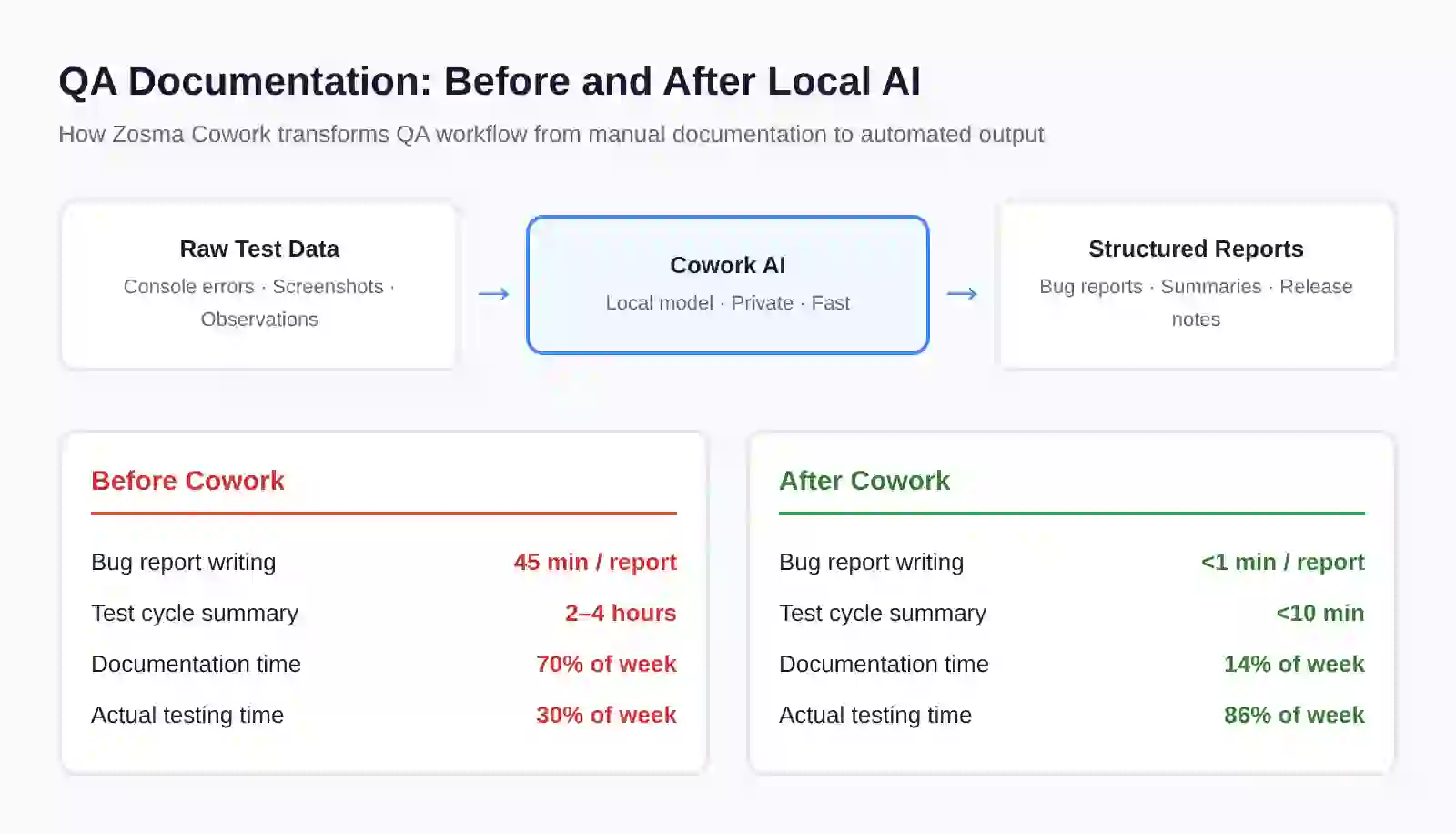
QA engineers spend up to 70% of their time writing documentation instead of finding bugs. Zosma Cowork uses local AI to automatically generate structured bug reports, test summaries, and release documentation from raw test data. Your test data never leaves your machine.
The QA Documentation Bottleneck
QA professionals spend approximately 70% of their working time on documentation rather than actual quality assurance work. According to a BioPhorum benchmarking study, a single minor deviation investigation consumes 18.1 hours of activity time, and the average site processes around 1,500 deviations per year. The Sembi Software Quality Pulse Report surveyed nearly 4,000 QA engineers in 2026 and found that 44.7% of QA teams report being understaffed, with no expected headcount growth in the next 12 months.
The math is straightforward. When your most expensive resource spends the majority of their time writing reports instead of finding defects, your release quality drops and your burnout rates climb. Industry surveys consistently report burnout rates of 55-70% among QA professionals burdened by administrative workload.
Where the Time Goes
A typical QA engineer spends their week across several activities:
- Bug report writing: 20-25% of sprint time spent documenting steps to reproduce, expected behavior, actual results, severity ratings, and screenshots
- Test case documentation: 15-20% writing and maintaining test cases from user stories, with 6-12 hours per sprint per SDET
- Test summary generation: 10-15% compiling release test reports, pass/fail summaries, and regression results
- Actual testing and bug finding: Only 40-50% remaining for the work they were hired to do
Why This Is Getting Worse in 2026
AI-generated code is exploding the testing workload. The Sembi 2026 report found that 53% of all code is now AI-generated or AI-assisted, and 61% of QA teams report moderate to dramatic increases in testing demand. Meanwhile, 52% of QA engineers report that bug volume has increased since their developers started using AI coding tools.
The testing pyramid is growing wider at the base while headcount stays flat or shrinks.
What QA Teams Document Daily
Every QA workflow generates documentation artifacts that follow predictable patterns. A bug report needs a title, description, environment details, reproduction steps, severity classification, and evidence. A test summary needs scope, pass/fail counts, blocked items, risks, and sign-off status. A release note needs feature descriptions, known issues, and compatibility information.
These documents share a common structure. They take raw, unstructured observations from testing and convert them into standardized formats that stakeholders can act on. This conversion process is mechanical, repetitive, and follows clear rules. It is exactly the kind of work that AI handles well.
The Bug Report Pattern
Most bug reports follow a template:
- Title: one-line summary of the defect
- Description: what the bug is
- Steps to reproduce: numbered sequence
- Expected result: what should happen
- Actual result: what actually happens
- Environment: browser, OS, app version
- Severity: critical, high, medium, low
- Evidence: screenshots, logs, console errors
A QA engineer who finds 15 bugs in a sprint spends roughly 15-20 hours just writing bug reports. That is an entire work week documenting defects instead of finding them.
The Test Summary Pattern
After each test cycle, QA teams produce:
- Executive summary with overall status
- Test coverage metrics and gaps
- Defect breakdown by severity and module
- Risk assessment for release
- Recommendations for sign-off or hold
Compiling these summaries from scattered test results takes 2-4 hours per cycle per engineer.
How AI Changes QA Documentation
The 2026 PractiTest State of Testing Report found that 76.8% of organizations now use AI in testing, up from 70.6% the previous year. Among the top use cases, test case creation leads at 69.6%, followed by script and test maintenance at 59.6%. Only 19.9% use AI for risk identification.
The pattern is clear. Teams are pointing AI at the repetitive, high-volume documentation work. The current crop of AI tools is built for exactly this lane. It generates the first draft of a bug report, converts test results into summary formats, and drafts documentation from structured inputs.
The Maturity Gap
The same PractiTest report found that only 2.1% of teams describe their AI testing capabilities as optimized. More than 85% are still in the initial or experimenting stages. This is not because AI cannot help with documentation. It is because most AI testing tools send data to cloud APIs, raising privacy concerns for teams that handle sensitive applications, customer data, and internal business logic.
Anthropic, OpenAI, Google, and other cloud AI providers process your data on their servers. When you are documenting bugs in a financial application, a healthcare system, or internal enterprise software, sending that context to a third-party API is not an option.
This is where local AI changes the equation. When your AI model runs on your own machine, you can share almost anything with zero risk. Your bug reports, test data, screenshots, and logs stay on your hardware. The only cost is electricity.
How Zosma Cowork Automates QA Documentation
Zosma Cowork is a free desktop AI harness that connects to local models running on your own PC. You pay as little as ₹500/month for the AI brain, and all your context stays on your machine. For QA teams, this means you can feed raw test data directly into the AI without privacy concerns and get structured documentation back in seconds.
Automating Bug Reports
Give Cowork raw observations from your testing session. Paste console errors, describe what you saw, upload a screenshot. Cowork generates a complete bug report in your team's standard format. The report includes a clear title, structured reproduction steps, severity classification based on impact, and organized evidence.
One QA engineer at a Bangalore fintech startup described the difference: "I used to spend 45 minutes writing a thorough bug report. With Cowork, I describe the issue in plain English, paste the error log, and get a structured report in under a minute. I can find two more bugs in the time I used to spend documenting one."
Generating Test Summaries
After a test cycle, feed Cowork your raw results. Pass/fail counts from your test runner, blocked items from your tracker, notes from exploratory testing. Cowork compiles everything into a formatted test summary with executive overview, coverage metrics, defect distribution, and release recommendations.
Creating Release Documentation
Release notes, changelogs, and compatibility documentation follow predictable structures. Give Cowork your commit history, test results, and known issues. It generates professional release documentation that stakeholders can review and ship directly.
Maintaining Test Case Libraries
Test maintenance consumes an estimated 40-60% of total testing effort according to the Capgemini World Quality Report. Cowork helps update existing test cases when application behavior changes. Feed it the new behavior description and your existing test case. It produces an updated version that maintains the original structure while reflecting the changes.
Privacy-First Local AI for QA Work
QA teams work with data that cloud APIs cannot touch. They test applications handling customer financial records, healthcare information, proprietary business logic, and internal workflows. Sending this context to Anthropic, OpenAI, or Google requires a risk assessment that most engineering leaders cannot approve.
Zosma Cowork eliminates that friction entirely. The AI model runs on your own hardware. Your test data, bug reports, screenshots, and logs never leave your PC. You can share almost anything with zero risk because there is nowhere for the data to go.
When we tested Cowork with QA teams handling sensitive financial applications, the difference was immediate. Engineers who previously avoided AI tools due to privacy constraints started using it within their first hour. They fed raw crash logs, production error traces, and customer-reported issues directly into the system. The output was structured documentation ready for stakeholder review.
The cost model is straightforward. You only pay for electricity. The AI brain subscription starts at ₹500/month, and the inference happens locally on your machine. There are no per-token charges, no API rate limits, and no cloud data processing.
Measuring the Impact
The time savings compound across a sprint cycle. If a QA engineer spends 15 hours per sprint on documentation and automation reduces that by 80%, they recover 12 hours per sprint for actual testing work. Over a quarter of 13 weeks, that is 156 additional testing hours per engineer.
Impact on Defect Detection
More testing time means more bugs caught before release. A QA engineer who can focus on finding defects instead of documenting them will discover edge cases, integration issues, and regression problems that they would have missed when drowning in paperwork. The quality signal-to-noise ratio improves because the engineer's energy goes toward quality judgment rather than clerical work.
Impact on Team Morale
The BioPhorum study found that burnout is the leading cause of QA attrition. Senior QA professionals take 6-12 months and $150,000-$250,000 to replace. When documentation automation removes the clerical burden, the work becomes intellectual again. The people you can least afford to lose are the ones most likely to stay.
Team Scaling Without Headcount Growth
With 44.7% of QA teams understaffed and no expected hiring relief, automation is not optional. The Sembi 2026 report found that 53% of organizations manage between six and 10 separate AI or automation tools, creating operational complexity. Cowork consolidates documentation automation into one local interface without adding another SaaS dashboard to manage.
Getting Started: QA Automation on Your Desktop
Cowork works with any local AI model running on your machine. Set up takes under 10 minutes. Open Cowork, connect to your local model, and start feeding it test data. The structured documentation appears in seconds.
Here are three workflows to start with today:
Bug report generation: Paste your observation, error log, and screenshot description. Get a formatted bug report in your team's template.
Test cycle summary: Feed pass/fail results, blocked items, and risk notes. Receive an executive summary ready for stakeholder review.
Test case updates: When application behavior changes, give Cowork the old test case and the new expected behavior. Get an updated version that maintains structure.
Enterprise clusters are not for everyone. Start without infrastructure and scale when ready. Use Cowork to validate local AI benefits for your QA workflow before committing to larger deployments.
Frequently Asked Questions
Does Cowork replace QA engineers?
No. Cowork automates the documentation work that consumes 70% of QA time. Engineers spend their recovered time on actual testing, risk analysis, and quality judgment. The role shifts from clerical to strategic, which is exactly where QA needs to go.
What kind of hardware do I need for local AI?
Cowork connects to local models running on your existing PC. The system is designed to work with consumer-grade hardware. You do not need a server cluster or specialized GPU to get started. Start with what you have and scale when ready.
Can Cowork integrate with our existing bug tracking tools?
Cowork generates structured documentation in formats you can copy directly into Jira, GitHub Issues, or any bug tracker. The output follows standard templates. You export the structured content and paste it into your existing workflow.
How does Cowork handle sensitive or proprietary data?
All processing happens locally on your machine. Your test data, bug reports, and application details never leave your PC. Unlike cloud AI services from Anthropic, OpenAI, or Google, there is no third-party data processing. You only pay for electricity.
Can Cowork generate documentation in different formats?
Yes. Cowork can produce bug reports, test summaries, release notes, and changelogs in the format your team uses. Describe your template structure once, and Cowork generates all future documents in the same format consistently.
How Zosma Helps with QA Documentation
Zosma Cowork addresses the documentation burden that consumes 70% of QA engineers' time by automating structured report generation using local AI.
- Automated bug reports: Generate complete bug reports from raw observations, error logs, and screenshots in seconds
- Test cycle summaries: Compile pass/fail results, blocked items, and risk assessments into executive-ready summaries
- Test case maintenance: Update existing test cases when application behavior changes, maintaining structure automatically
- Release documentation: Generate changelogs, release notes, and compatibility documentation from commit history and test results
Cowork is a free desktop harness. Pay as little as ₹500/month for the AI brain. Your context stays on your PC.
Start automating your QA documentation: Try Zosma Cowork